RSS.com asks creators to disclose AI use when AI does the creative work your listeners came for. You can publish AI-assisted and fully AI-generated podcasts on RSS.com, as long as they follow our Terms of Service. Labeling those episodes keeps your listeners' trust and matches what the industry and advertisers expect.
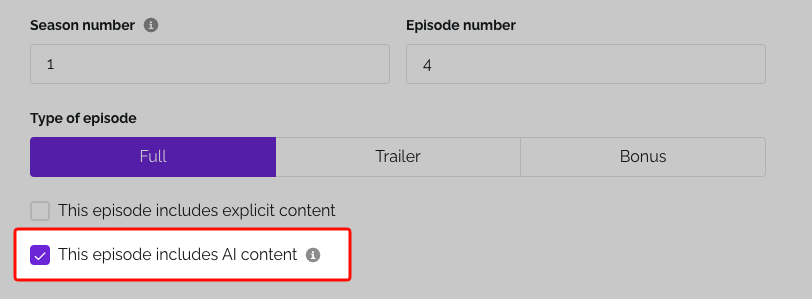
When should you use the AI label?
Use the AI label when AI produces a significant part of your episode's core substance, whether that's the voice, the music or the synthesis of the episode.
Ask yourself whether AI is doing the creative work your listeners came for. If AI is the performer, delivering the content listeners engage with, disclose. If AI is a production tool that supports your creative work, no disclosure is needed.
Not sure whether your episode needs the label? Use this free online tool to find out.
Examples
| Scenario | Label it? | Why |
|---|---|---|
| An AI voice narrates the episode, or it's an AI conversation such as NotebookLM | Yes | AI is the performer. |
| You clone your own voice to deliver a script you wrote yourself | Yes | The voice listeners hear is synthetic, and Apple asks for synthetic voices to be disclosed. |
| AI writes your script and you record it in your own voice | Yes | AI created the substance your listeners came for, even though a person performed it. |
| AI-generated background music, sound effects or a short intro bumper | No | These are production elements, not the substance of the episode. |
| Noise removal, filler-word removal, audio leveling, transcripts or show notes | No | These are standard production tools. |
How to label an episode
When you create or edit an episode, answer Does this episode include AI content? with Yes or No, then save the episode. To edit an episode you've already published, open the Episodes tab, click the three dots next to it and select Edit.
Your show's label follows from its episodes. If any episode answers Yes, the show carries the AI label too. We add the label to your RSS feed and show it on your episode page.
Platform requirements
Each major platform has its own rules, and they change, so check each platform's guidelines too.
Apple Podcasts
Apple asks creators who use AI to generate audio, including synthetic voices, AI hosts and replicas of real people, to disclose it prominently in the content and in the metadata of each episode and show (Apple's content guidelines). Apple also prohibits using AI to mislead listeners, for example with fabricated news or manipulated audio.
Answering Yes adds the AI label to your RSS feed, but Apple Podcasts does not read that label. To follow Apple's guideline, add a short spoken line to the episode, such as "This episode was created with AI.", and say it in the episode description and in your show description.
Spotify
Spotify has no mandatory AI disclosure for podcasts. Its creator guidance asks you not to deceive listeners, not to infringe intellectual property rights, and to keep human oversight of what you publish. Spotify can remove episodes that break its Platform Rules, and deceptive use breaks them whether or not you label it.
YouTube
YouTube requires disclosure when your content shows a real person saying or doing something they never did, shows a realistic event that didn't happen, or could be mistaken for real footage. It doesn't require it for clearly unrealistic content, minor edits, or AI help with scripts, thumbnails or outlines. You disclose in YouTube Studio when you upload. For sensitive topics such as health, news or finance, YouTube may show a more prominent label on the video.
If you don't disclose
When a required disclosure is missing, platforms can remove content, restrict or suspend accounts, or stop monetization. When in doubt, disclose.
For the full framework, worked examples and a comparison of what Apple Podcasts, YouTube, Spotify, Meta and the EU AI Act require, read the complete guide.
Related: How do I edit or delete a single podcast episode? · Am I able to use copyrighted music inside my podcast? · Who is the owner of the podcast content?
Was this article helpful?
That’s Great!
Thank you for your feedback
Sorry! We couldn't be helpful
Thank you for your feedback
Feedback sent
We appreciate your effort and will try to fix the article