With the PAID feature enabled on your RSS.com account, you have the power to insert Mid-Roll ads into your podcast episodes, helping you monetize effectively without compromising your listener experience. RSS.com offers two ways to implement Mid-Roll ads: Automatic and Manual Mid-Rolls.
Automatic Mid-Rolls: A Hassle-Free Option
By default, PAID comes with Automatic Mid-Rolls activated.
It figures out where to place ads by trying to spread them as evenly as possible throughout your episode, aiming for roughly one break every 12 minutes.
Rather than dropping ads at arbitrary points in your audio, the system looks for natural pauses first: if you've added chapter markers, it'll try to insert ads right at the end of a chapter (which feels less disruptive to listeners than cutting someone off mid-sentence).
If no chapter marker is nearby, it simply splits the longest uninterrupted stretch of audio in half and places the ad there. It keeps repeating that process, always targeting the longest remaining gap, until the spacing feels balanced across the whole episode.
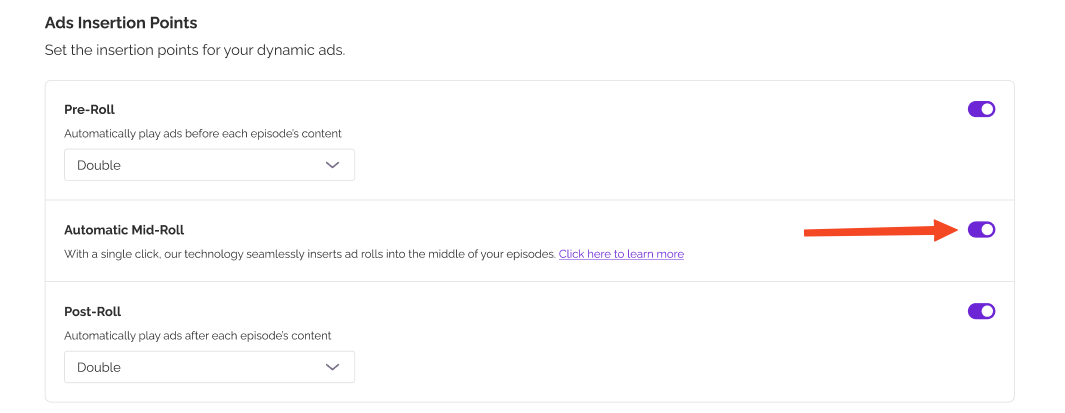
You can toggle the feature ON and OFF right from your PAID settings, in the Ad Insertion Points section.
Manual Mid-Rolls: Full Control Over Your Ad Placements
Once you activate the PAID feature, a new Mid-Roll icon will appear in the add-ons list for each episode card in your dashboard.
Manual Mid-Rolls allow you to strategically place ads in moments that best fit your content and you can always edit or adjust your placements later.

How to Add Manual Mid-Rolls?
- Click the Mid-Roll Icon: The first time you click this icon, a video walkthrough will automatically launch. This video provides a detailed, step-by-step guide on how to use the Mid-Roll feature effectively.
- Continue to the Placement Modal: After watching (or skipping) the video, you can click “Continue”, which will open a familiar interface, similar to the one used for chapters and soundbites.
- Customize Your Mid-Roll Placements: You can manually add up to 10 Mid-Roll ad spots per episode. Simply select the timestamps where you’d like the ads to be inserted for optimal listener experience.
Important: If you have manually placed mid-rolls in an episode, they will override the automatic setting, even if it is enabled. Manually added placements always take priority.
Important: Everything on this page applies to your audio episodes. Video episodes on the Max plan use a set layout of one pre-roll, automatic mid-rolls and two post-rolls. How video ads and revenue work covers video.
Was this article helpful?
That’s Great!
Thank you for your feedback
Sorry! We couldn't be helpful
Thank you for your feedback
Feedback sent
We appreciate your effort and will try to fix the article